 Scan to join WeChat group
article
README
🚀 中国城市天气查询 MCP 服务
本服务基于高德地图 API,是一个中国城市天气查询的 Model Context Protocol (MCP) 服务。用户通过简单请求,就能获取中国各城市的实时天气状况以及未来几天的天气预报。
🚀 快速开始
本服务允许用户通过简单的请求获取中国各城市的实时天气状况和未来几天的天气预报。以下为你介绍使用前的安装步骤和使用方法。
✨ 主要特性
- 使用高德地图天气 API,获取精确的中国城市天气数据。
- 支持查询实时天气状况。
- 支持查询未来 3 - 4 天的天气预报。
- 支持智能城市名称识别,涵盖城市、区县级别的查询。
- 支持城市名称搜索功能。
- 实现为标准 MCP 服务,便于集成到 AI 应用中。
📦 安装指南
前提条件
- 需配置高德地图开发者 API 密钥,可通过环境变量进行配置。
安装步骤
- 克隆或下载本仓库。
- 进入项目目录。
- 使用 uv 安装依赖:
uv venv
source .venv/bin/activate
uv add "mcp[cli]" httpx
💻 使用示例
启动 MCP 服务
若你需自行创建客户端测试该 MCP 服务,可手动启动。在终端中执行以下命令启动 MCP 服务:
uv run weather.py
使用集成的 MCP 服务
在 Claude Desktop 中使用
若想在 Claude Desktop 中使用,请添加服务器配置。请在文本编辑器中打开 Claude for Desktop App 配置,路径参考如下 ~/Library/Application Support/Claude/claude_desktop_config.json。若文件不存在,请确保创建该文件。
{
    "mcpServers": {
        "amap-weather-mcp-server": {
            "command": "uv",
            "args": [
                "--directory",
                "/ABSOLUTE/PATH/TO/PARENT/FOLDER/weather",
                "run",
                "weather.py"
            ],
            "env": {
                "AMAP_API_KEY": "YOUR_API_KEY_HERE"
            }
        }
    }
}
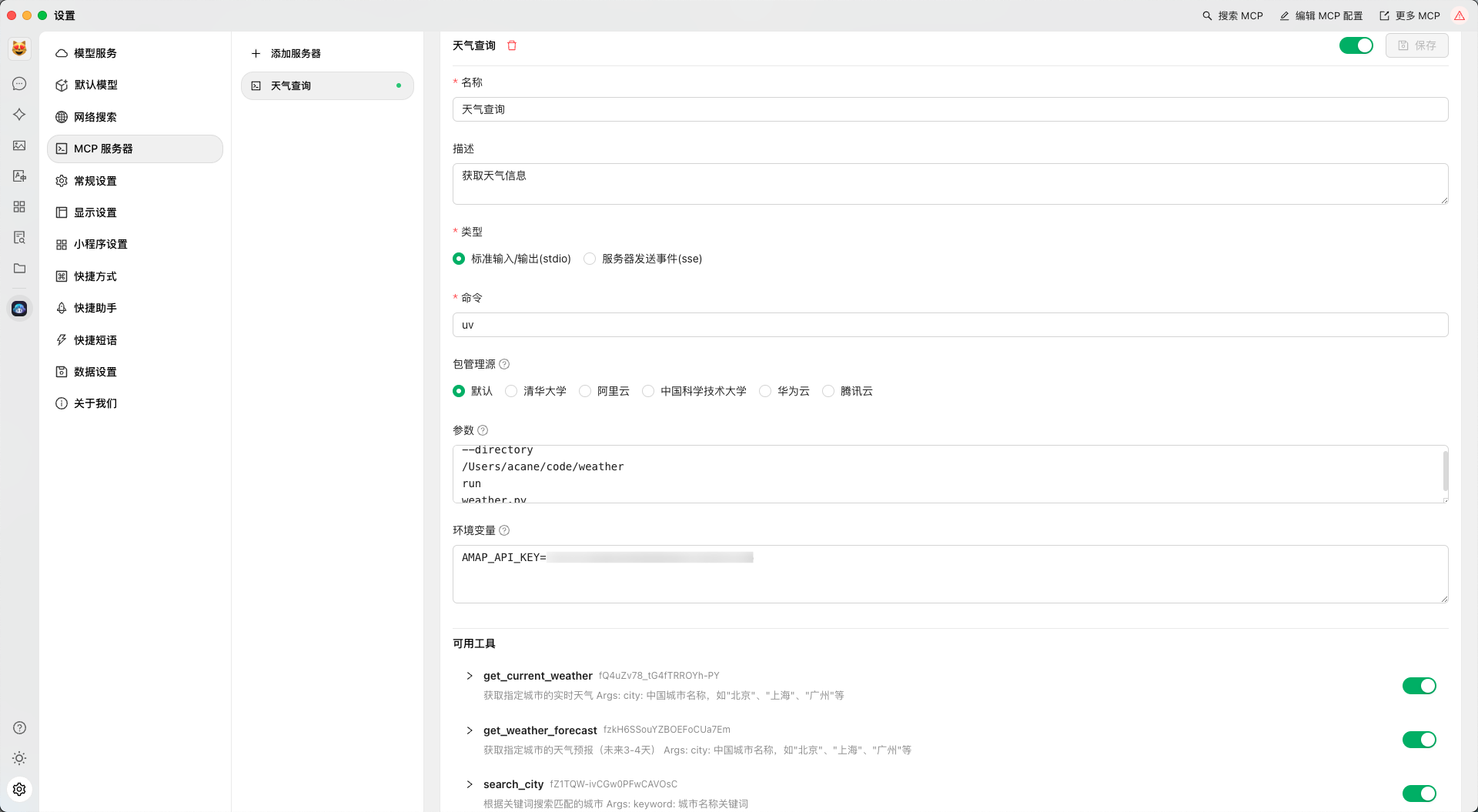
在 Cherry Studio 中使用
如下图所示配置即可:
调用服务
MCP 服务提供了三个主要工具函数用于天气查询:
get_current_weather:获取城市当前天气状况。get_weather_forecast:获取未来几天的天气预报。search_city:搜索城市名称。
使用 MCP 客户端调用示例:
from mcp.client import Client

# 连接到服务
client = Client("amap-weather-mcp-server")

# 查询实时天气
current_weather = client.get_current_weather()
print(current_weather)

# 查询未来天气预报
forecast = client.get_weather_forecast()
print(forecast)

# 搜索城市
cities = client.search_city("上海")
print(cities)
⚠️ 重要提示
- 环境变量必须正确配置,否则 API 请求将失败。
- 城市名称识别支持直接输入城市名称或区县名称(建议带上行政区划标识如"市"、"县"、"区"等)。
- 高德地图 API 的使用需遵守其服务条款和限制。