
Back to MCP directory
publicPublicdnsLocal runtime

C# Language Features

Bifrost是一个VSCode扩展,提供MCP服务器,将VSCode的开发工具和语言功能暴露给AI工具,增强AI编程助手的能力。

article

README

🚀 Bifrost MCP 服务器

Bifrost MCP 服务器是一款可在 VS Code 中使用的扩展,它能为开发者提供便利的代码处理服务。借助该服务器,开发者可以利用 AI 助手完成查找引用、工作区符号搜索等任务,提升开发效率。

🚀 快速开始

安装步骤

  1. 从 VS Code 市场安装此扩展。
  2. 安装所需的语言特定扩展(例如 C# 扩展用于 C# 文件)。
  3. 在 VS Code 中打开您的项目。

启动与配置

当激活此扩展时,MCP 服务器会自动启动。要配置 AI 助手使用该服务器:

  1. 服务器默认运行在端口 8008。
  2. 配置您的 MCP 兼容 AI 助手连接到:
    • SSE 端点:http://localhost:8008/sse
    • 消息端点:http://localhost:8008/message

✨ 主要特性

可用命令

  • Bifrost MCP: 启动服务器 - 手动在 8008 端口启动 MCP 服务器。
  • Bifrost MCP: 在指定端口启动服务器 - 手动在指定端口启动 MCP 服务器。
  • Bifrost MCP: 停止服务器 - 停止正在运行的 MCP 服务器。
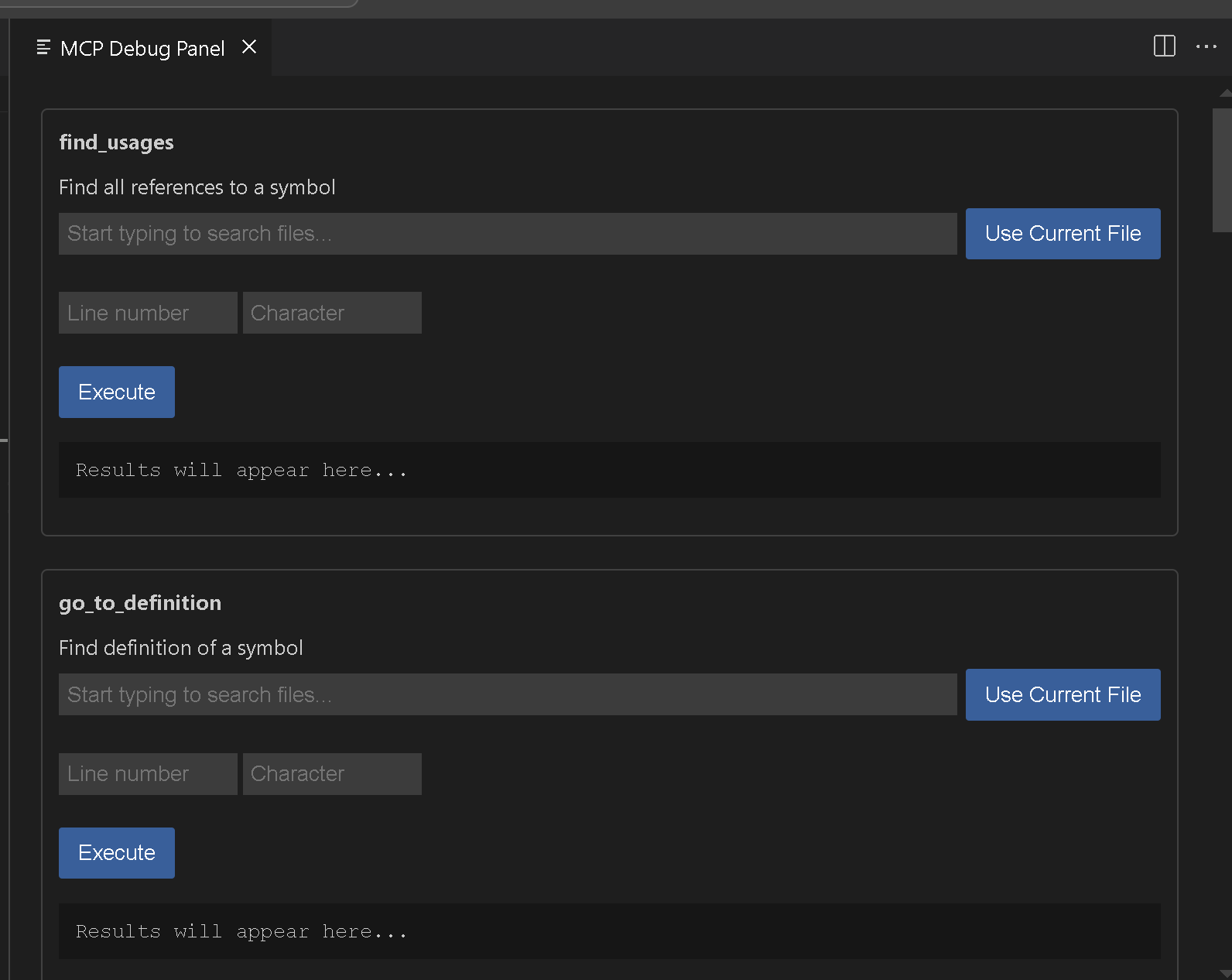
  • Bifrost MCP: 打开调试面板 - 打开调试面板以测试可用工具。

image

💻 使用示例

基础用法

查找引用

{
  "name": "find_usages",
  "arguments": {
    "textDocument": {
      "uri": "file:///path/to/your/file"
    },
    "position": {
      "line": 10,
      "character": 15
    },
    "context": {
      "includeDeclaration": true
    }
  }
}

工作区符号搜索

{
  "name": "get_workspace_symbols",
  "arguments": {
    "query": "MyClass"
  }
}

📚 详细文档

调试

使用 MCP: 打开调试面板 命令。 image
故障排除

如果遇到问题:

  1. 确保安装了适合您项目的适当语言扩展。
  2. 检查项目是否在 VS Code 中正确加载。
  3. 验证系统上 8008 端口是否可用。
  4. 查看 VS Code 输出面板中的任何错误消息。

贡献

如果您想添加更多功能,请参阅 Vscodes 命令。我认为我们仍然需要重命名和其他一些功能。请随时提交问题或拉取请求到 GitHub 仓库

📄 许可证

此扩展根据 APGL - 3.0 许可证发布。

READY-TO-PASTE CONFIG

MCP client config generator

Choose your client, fill the required environment variables, then copy a config generated from this server's published metadata

terminal
checkNo environment variables required
Claude Desktop
{
  "mcpServers": {
    "bifrost": {
      "command": "cmd",
      "args": [
        "/c",
        "npx",
        "-y",
        "supergateway",
        "--sse",
        "http://localhost:8008/sse"
      ]
    }
  }
}
Save toclaude_desktop_config.json
help

Runtime guide

cloud

Hosted runtime

Hosted servers run from a provider-managed environment. You usually connect the MCP client to the hosted endpoint or follow the provider's authorization flow, without keeping a local process alive

  1. Open provider connection page
  2. Authorize or copy endpoint
  3. Connect from your MCP client
terminal

Local runtime / other methods

Local servers run on your own machine or infrastructure. You normally copy the server_config into your MCP client, install the required package, and provide env variables from env_schema when needed

  1. Copy server_config
  2. Install required package
  3. Fill env variables and restart client
