 Scan to join WeChat group
article
README
🚀 Fused MCP Agent:数据MCP服务器的搭建设置
MCP服务器允许像Claude这样的大语言模型(LLM)进行HTTP请求,使其能够连接到API并执行代码。本仓库旨在方便我们自己以及所有处理数据的人员,可直接将_任何Python代码_传递到本地的Claude应用程序。
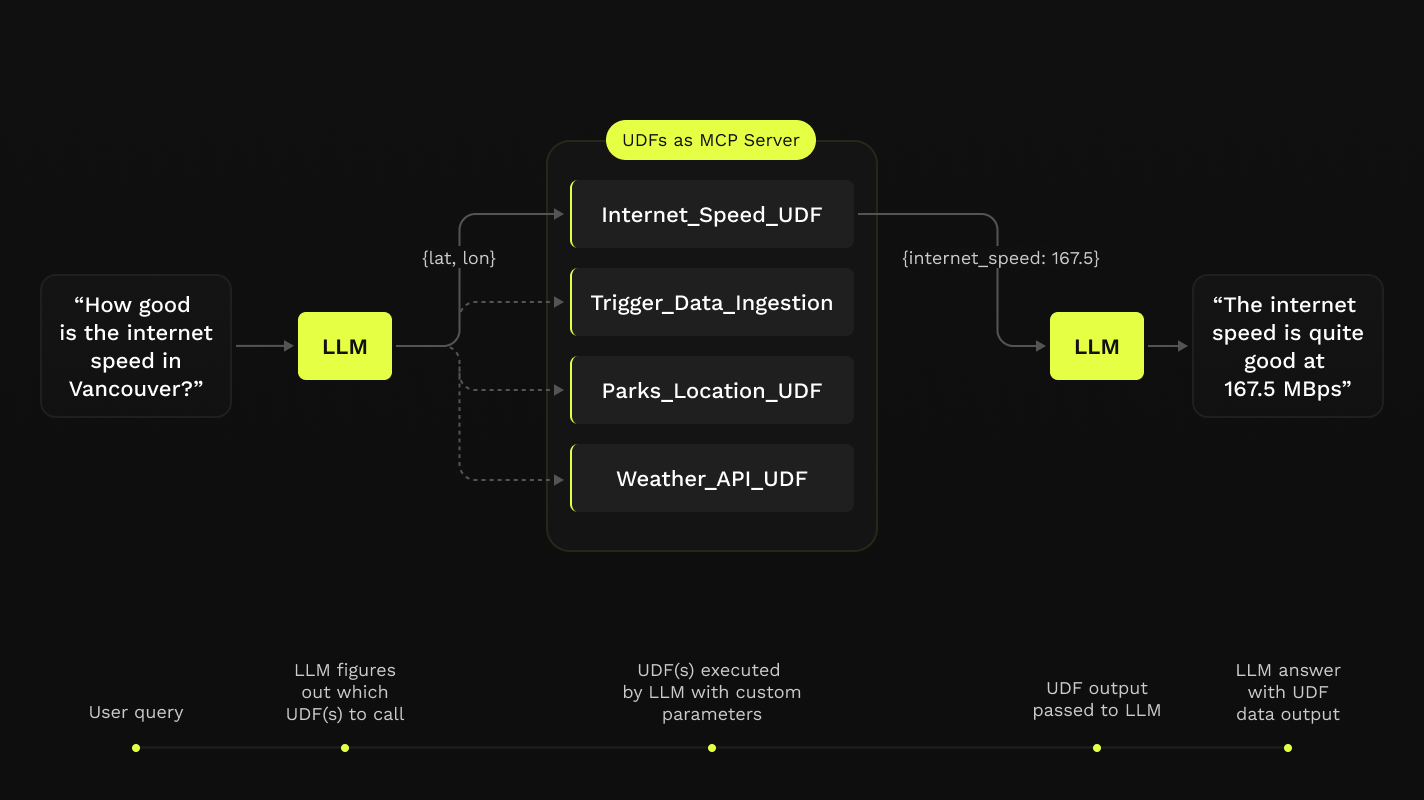
此仓库提供了一个简单的分步笔记本工作流,用于在Fused用户定义函数(UDFs)之上,使用Python设置Claude桌面应用程序的MCP服务器。

✨ 主要特性
- 允许Claude等LLM进行HTTP请求,连接API和执行代码。
- 提供简单的分步笔记本工作流,便于设置MCP服务器。
- 支持在本地机器上运行,无需Fused账户。
📦 安装指南
先决条件
- Python 3.11
- 最新安装的Claude桌面应用程序(macOS和Windows)
⚠️ 重要提示
如果您使用的是Linux,桌面应用程序不可用,因此我们为无需Claude桌面应用程序即可运行的本地Claude客户端提供了一个简单的设置方法!
💡 使用建议
您不需要Fused账户即可完成任何上述操作!所有内容都在您的本地机器上运行。
安装步骤
-
在任何本地目录中克隆此仓库,并导航到该仓库:
git clone https://github.com/fusedio/fused-mcp.git cd fused-mcp -
安装依赖项:
pip install -r requirements.txt
🚀 快速开始
- 配置Claude桌面应用程序:
- 打开Claude桌面应用程序。
- 转到设置,找到MCP服务器集成部分。
- 添加一个新的MCP服务器,指定其命令和参数。
- 注册和安装:
- 在Anthropic控制台创建一个账户并获取API密钥。
- 安装必要的依赖项,包括
uv工具。
- 启动MCP服务器:
uv run main.py --agent get_current_time - 使用本地客户端(可选):
- 如果您没有Claude桌面应用程序,可以在另一终端会话中启动本地客户端:
uv run client.py http://localhost:8080/sse
- 如果您没有Claude桌面应用程序,可以在另一终端会话中启动本地客户端:
💻 使用示例
使用本地Claude客户端(无需Claude桌面应用程序)
如果您无法安装Claude桌面应用程序(例如在Linux上),我们提供一个小型示例本地客户端界面来使用此仓库中配置的MCP服务器:
⚠️ 重要提示
在此情况下,您需要Anthropic API密钥,因为不会使用到Claude桌面应用程序。
-
创建
.env文件:touch .env -
在
.env文件中添加您的API密钥:# .env ANTHROPIC_API_KEY = "your-key-here" -
启动MCP服务器:
uv run main.py --agent get_current_time -
在另一终端会话中启动本地客户端,指定服务器地址:
uv run client.py http://localhost:8080/sse
通过以上步骤,您可以轻松配置和使用MCP服务器与Claude进行交互。
🤝 贡献
欢迎为仓库中的udfs/目录添加自己的UDF,这样其他人也可以在本地尝试使用它们!