 Scan to join WeChat group
article
README
🚀 🐇 MCP SQLite 服务器
MCP SQLite 服务器是一个提供全面 SQLite 数据库交互功能的模型上下文协议(MCP)服务器,可助力用户便捷地对 SQLite 数据库进行各类操作。

🚀 快速开始
维护者
✨ 主要特性
- 支持完整的 CRUD 操作(创建、读取、更新、删除),可对数据库数据进行全面管理。
- 具备数据库探索和 introspection 功能,方便用户深入了解数据库。
- 能够执行自定义 SQL 查询,满足多样化的查询需求。
📦 安装指南
在你的 IDE 的 MCP 服务器设置中定义命令:
通用设置
例如,在 Cursor 中:
{
    "mcpServers": {
        "MCP SQLite Server": {
            "command": "npx",
            "args": [
                "-y",
                "mcp-sqlite",
                "<path-to-your-sqlite-database.db>"
            ]
        }
    }
}
Windows 用户设置
{
    "mcpServers": {
        "MCP SQLite Server": {
            "command": "cmd",
            "args": [
                "/c",
                "npx",
                "-y",
                "mcp-sqlite",
                "<path-to-your-sqlite-database.db>"
            ]
        }
    }
}
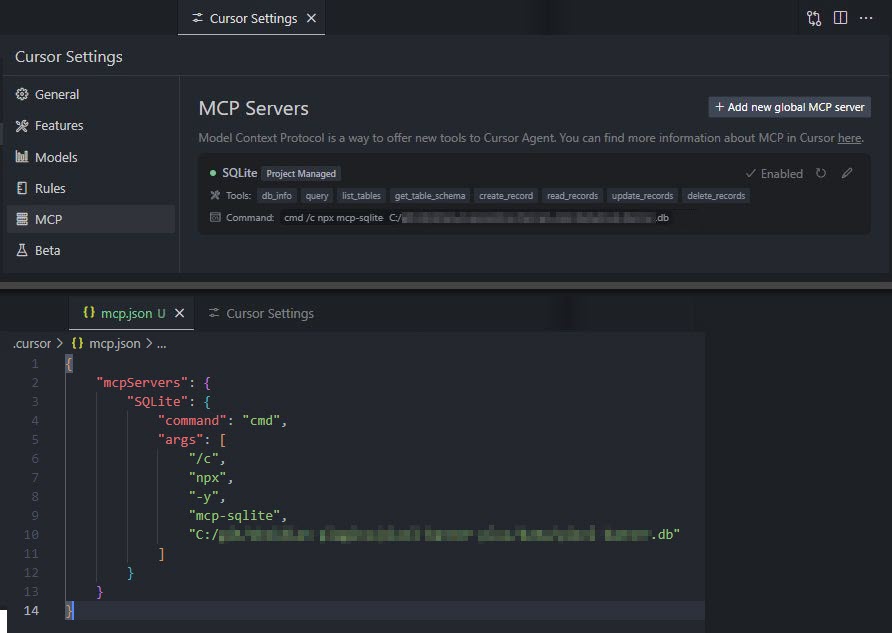
注意:你的数据库路径必须作为参数提供。
💻 使用示例
基础用法
数据库信息
db_info
获取有关连接到的数据库的详细信息。
{
  "method": "tools/call",
  "params": {
    "name": "db_info",
    "arguments": {}
  }
}
list_tables
列出数据库中的所有表。
{
  "method": "tools/call",
  "params": {
    "name": "list_tables",
    "arguments": {}
  }
}
get_table_schema
获取表的详细架构信息。
{
  "method": "tools/call",
  "params": {
    "name": "get_table_schema",
    "arguments": {
      "table_name": "users"
    }
  }
}
CRUD 操作
create
插入新数据。
{
  "method": "tools/call",
  "params": {
    "name": "create",
    "arguments": {
      "table_name": "users",
      "data": {
        "name": "Alice",
        "age": 30
      }
    }
  }
}
read
读取数据。
{
  "method": "tools/call",
  "params": {
    "name": "read",
    "arguments": {
      "table_name": "users",
      "conditions": {
        "age": 25
      }
    }
  }
}
update
更新数据。
{
  "method": "tools/call",
  "params": {
    "name": "update",
    "arguments": {
      "table_name": "users",
      "conditions": {
        "id": 1
      },
      "updates": {
        "age": 31
      }
    }
  }
}
delete
删除数据。
{
  "method": "tools/call",
  "params": {
    "name": "delete",
    "arguments": {
      "table_name": "users",
      "conditions": {
        "id": 1
      }
    }
  }
}
自定义查询
query
对连接到的 SQLite 数据库执行自定义 SQL 查询。
{
  "method": "tools/call",
  "params": {
    "name": "query",
    "arguments": {
      "sql": "SELECT * FROM users WHERE id = ?",
      "values": [1]
    }
  }
}
🔧 技术细节
本项目使用了以下技术:
📄 许可证
文档中未提及许可证相关信息。
致谢
如果你喜欢这个库,请考虑通过以下方式支持我的工作 😀