 Scan to join WeChat group
README
🚀 MCP TMDB
本项目实现了模型上下文协议(MCP),提供了与电影数据库(TMDB)进行交互的工具。
🚀 快速开始
本项目是基于模型上下文协议(MCP)的实现,提供了与电影数据库(TMDB)交互的工具。TMDB 是一个流行的、用户可编辑的电影和电视剧数据库,拥有丰富的影视信息。
前提条件
- Node.js(推荐版本:18 或更高)
- pnpm(版本 10.7.0 或更高)
安装步骤
- 克隆仓库:
git clone https://github.com/leonardogilrodriguez/mcp-tmdb.git
cd mcp-tmdb
- 安装依赖:
pnpm install
- 在项目根目录创建一个
.env文件,并添加你的 TMDB API 密钥:
TMDB_API_KEY=your_api_key_here
运行项目
要运行 MCP 服务器:
pnpm inspector
要以调试模式运行:
pnpm dev:debug
✨ 主要特性
- 提供多种工具,可搜索演员共同出演的电影、人员合作的电影、在两部电影中工作过的人员等信息。
- 支持不同语言的搜索结果。
- 可配置在 Claude Desktop 中使用。
📦 安装指南
克隆项目
git clone https://github.com/leonardogilrodriguez/mcp-tmdb.git
cd mcp-tmdb
安装依赖
pnpm install
配置环境变量
在项目根目录创建 .env 文件,并添加 TMDB API 密钥:
TMDB_API_KEY=your_api_key_here
💻 使用示例
基础用法
运行 MCP 服务器
pnpm inspector
调试模式运行
pnpm dev:debug
高级用法
不同工具的使用
以下是各个工具的使用说明和参数:
1. two_actors_on_screen
搜索两位演员共同出现在屏幕上的电影。 参数:
actor1:第一位演员的姓名actor2:第二位演员的姓名language:(可选)结果语言(默认:"en")
2. two_people
搜索两个人以任何角色共同参与的电影。 参数:
person1:第一个人的姓名job1:第一个人的工作。可能的值:cast, crewperson2:第二个人的姓名job2:第二个人的工作。可能的值:cast, crewlanguage:(可选)结果语言(默认:"en")
3. two_movies
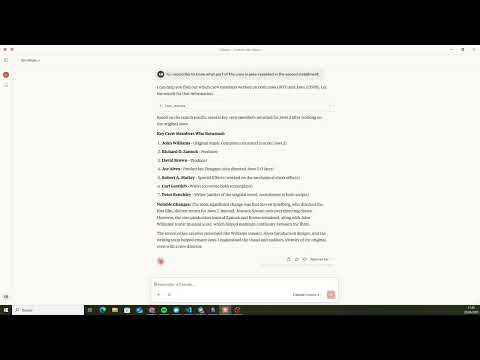
搜索在两部电影中以任何角色工作过的人员。 参数:
movie1:第一部电影的名称year1:(可选)第一部电影的年份movie2:第二部电影的名称year2:(可选)第二部电影的年份language:(可选)结果语言(默认:"en")
4. filmography_actor_genre
搜索某人作为演员在特定类型电影中的作品。 参数:
person:演员的姓名genre:(可选)类型名称language:(可选)结果语言(默认:"en")
5. filmography_crew_genre
搜索某人作为工作人员在特定类型电影中的作品。 参数:
person:人员的姓名job:(可选)工作名称genre:(可选)类型名称language:(可选)结果语言(默认:"en")
6. jobs_list
提供可在 filmography_crew_genre 工具中使用的工作列表。
📚 详细文档
项目结构
mcp-tmdb/
├── API/              # API 函数和实用工具
├── interfaces/       # 类型和接口定义
├── tools/           # 工具实现
├── main.ts          # 主入口点
├── package.json     # 项目配置
└── .env            # 环境变量(需创建)
主要依赖
| 属性 | 详情 |
|------|------|
| 主要依赖 | @modelcontextprotocol/sdk: ^1.12.1
dotenv: ^16.5.0
zod: ^3.25.55 |
MCP 配置
Claude Desktop
要在 Claude Desktop 中配置此 MCP:
- 打开 Claude Desktop
- 转到设置 > MCP 配置
- 添加一个新的 MCP,使用以下设置:
    "tmdb": {
      "disabled": false,
      "timeout": 60,
      "type": "stdio",
      "command": "tsx",
      "args": [
        "complete_path_to_mcp-tmdb\\main.ts"
      ],
      "env": {
        "TMDB_API_KEY": "your_api_key_here"
      }
    }
工具输出示例
1. two_actors_on_screen
搜索 Cary Grant 和 Katharine Hepburn 共同出演的电影的示例输出:
[
    {
        "id": 31866,
        "title": "Sylvia Scarlett",
        "year": 1935,
        "media_type": "movie"
    },
    {
        "id": 900,
        "title": "Bringing Up Baby",
        "year": 1938,
        "media_type": "movie"
    },
    {
        "id": 16274,
        "title": "Holiday",
        "year": 1938,
        "media_type": "movie"
    },
    {
        "id": 981,
        "title": "The Philadelphia Story",
        "year": 1940,
        "media_type": "movie"
    }
]
2. two_people
搜索 Christopher Nolan 和 Hans Zimmer 合作的电影的示例输出:
[
    {
        "id": 272,
        "title": "Batman Begins",
        "year": 2005,
        "media_type": "movie"
    },
    {
        "id": 155,
        "title": "The Dark Knight",
        "year": 2008,
        "media_type": "movie"
    },
    {
        "id": 27205,
        "title": "Inception",
        "year": 2010,
        "media_type": "movie"
    }
 	...
]
3. two_movies
搜索在 Titanic 和 The Lord of the Rings: The Return of the King 两部电影中工作过的人员的示例输出:
[{
        "id": 1369,
        "name": "Bernard Hill",
        "known_for_department": "Acting"
    },
    {
        "id": 1327030,
        "name": "Lora Hirschberg",
        "job": "Sound Re-Recording Mixer",
        "known_for_department": "Sound"
    },
    {
        "id": 900,
        "name": "Christopher Boyes",
        "job": "Sound Re-Recording Mixer",
        "known_for_department": "Sound"
    },
    {
        "id": 1378696,
        "name": "Ethan Van der Ryn",
        "job": "Sound Effects Editor",
        "known_for_department": "Sound"
    },
    {
        "id": 1425978,
        "name": "Gary Summers",
        "job": "Sound Re-Recording Mixer",
        "known_for_department": "Sound"
    }
]
4. filmography_actor_genre
搜索 Tom Hanks 的恐怖电影的示例输出:
[{
        "title": "He Knows You're Alone",
        "character": "Elliot",
        "media_type": "movie",
        "year": 1980
    },
    {
        "title": "The 'Burbs",
        "character": "Ray Peterson",
        "media_type": "movie",
        "year": 1989
    },
    {
        "title": "Vault of Horror I",
        "character": "Baxter",
        "media_type": "movie",
        "year": 1994
    }
]
5. filmography_crew_genre
搜索 Steven Spielberg 作为导演的喜剧电影的示例输出:
[{
        "title": "The Sugarland Express",
        "media_type": "movie",
        "year": 1974,
        "jobs": [
            "Director"
        ]
    },
    {
        "title": "1941",
        "media_type": "movie",
        "year": 1979,
        "jobs": [
            "Director"
        ]
    },
    {
        "title": "Amazing Stories",
        "media_type": "tv",
        "year": 1985,
        "jobs": [
            "Director"
        ]
    },
    {
        "title": "Hook",
        "media_type": "movie",
        "year": 1991,
        "jobs": [
            "Director"
        ]
    },
    {
        "title": "The Terminal",
        "media_type": "movie",
        "year": 2004,
        "jobs": [
            "Director"
        ]
    }
]
6. jobs_list
可用工作列表的示例输出:
{
  "jobs": [
    "Director",
    "Producer",
    "Screenplay",
    "Director of Photography",
    "Editor",
    "Production Design",
    "Art Direction",
    "Set Decoration",
    "Costume Design",
    "Makeup",
    "Sound",
    "Visual Effects",
    "Original Music Composer"
  ]
}
演示视频
two_actors_on_screen

two_movies
🔧 技术细节
关于 TMDB
电影数据库(TMDB)是一个流行的、用户可编辑的电影和电视剧数据库。它提供了一个全面的 API,允许开发者访问电影和电视剧数据,包括:
- 电影和电视剧信息
- 演员和工作人员详情
- 图片和海报
- 评分和评论
- 相似内容推荐
- 等等
API 概述
TMDB API 可免费使用,但需要 API 密钥。你可以通过以下步骤获取 API 密钥:
- 在 TMDB 创建一个账户
- 进入你的账户设置
- 选择 "API" 部分
- 请求一个 API 密钥
速率限制
API 有以下速率限制:
- 每 10 秒 40 个请求
- 每天 1000 个请求
有关 API 的更多信息,请访问 TMDB API 文档。
📄 许可证
本项目采用 MIT 许可证。