 微信扫一扫
微信扫一扫README

AI Gateway
AI Native API Gateway




Official Site | MCP Server QuickStart | Wasm Plugin Hub |
What is Higress?
Higress is a cloud-native API gateway based on Istio and Envoy, which can be extended with Wasm plugins written in Go/Rust/JS. It provides dozens of ready-to-use general-purpose plugins and an out-of-the-box console (try the demo here).
Core Use Cases
Higress's AI gateway capabilities support all mainstream model providers both domestic and international. It also supports hosting MCP (Model Context Protocol) Servers through its plugin mechanism, enabling AI Agents to easily call various tools and services. With the openapi-to-mcp tool, you can quickly convert OpenAPI specifications into remote MCP servers for hosting. Higress provides unified management for both LLM API and MCP API.
🌟 Try it now at https://mcp.higress.ai/ to experience Higress-hosted Remote MCP Servers firsthand:

Enterprise Adoption
Higress was born within Alibaba to solve the issues of Tengine reload affecting long-connection services and insufficient load balancing capabilities for gRPC/Dubbo. Within Alibaba Cloud, Higress's AI gateway capabilities support core AI applications such as Tongyi Bailian model studio, machine learning PAI platform, and other critical AI services. Alibaba Cloud has built its cloud-native API gateway product based on Higress, providing 99.99% gateway high availability guarantee service capabilities for a large number of enterprise customers.
Summary
Quick Start
Higress can be started with just Docker, making it convenient for individual developers to set up locally for learning or for building simple sites:
# Create a working directory
mkdir higress; cd higress
# Start higress, configuration files will be written to the working directory
docker run -d --rm --name higress-ai -v ${PWD}:/data \
        -p 8001:8001 -p 8080:8080 -p 8443:8443  \
        higress-registry.cn-hangzhou.cr.aliyuncs.com/higress/all-in-one:latest
Port descriptions:
- Port 8001: Higress UI console entry
- Port 8080: Gateway HTTP protocol entry
- Port 8443: Gateway HTTPS protocol entry
All Higress Docker images use Higress's own image repository and are not affected by Docker Hub rate limits. In addition, the submission and updates of the images are protected by a security scanning mechanism (powered by Alibaba Cloud ACR), making them very secure for use in production environments.
For other installation methods such as Helm deployment under K8s, please refer to the official Quick Start documentation.
Use Cases
-
MCP Server Hosting:
Higress hosts MCP Servers through its plugin mechanism, enabling AI Agents to easily call various tools and services. With the openapi-to-mcp tool, you can quickly convert OpenAPI specifications into remote MCP servers.
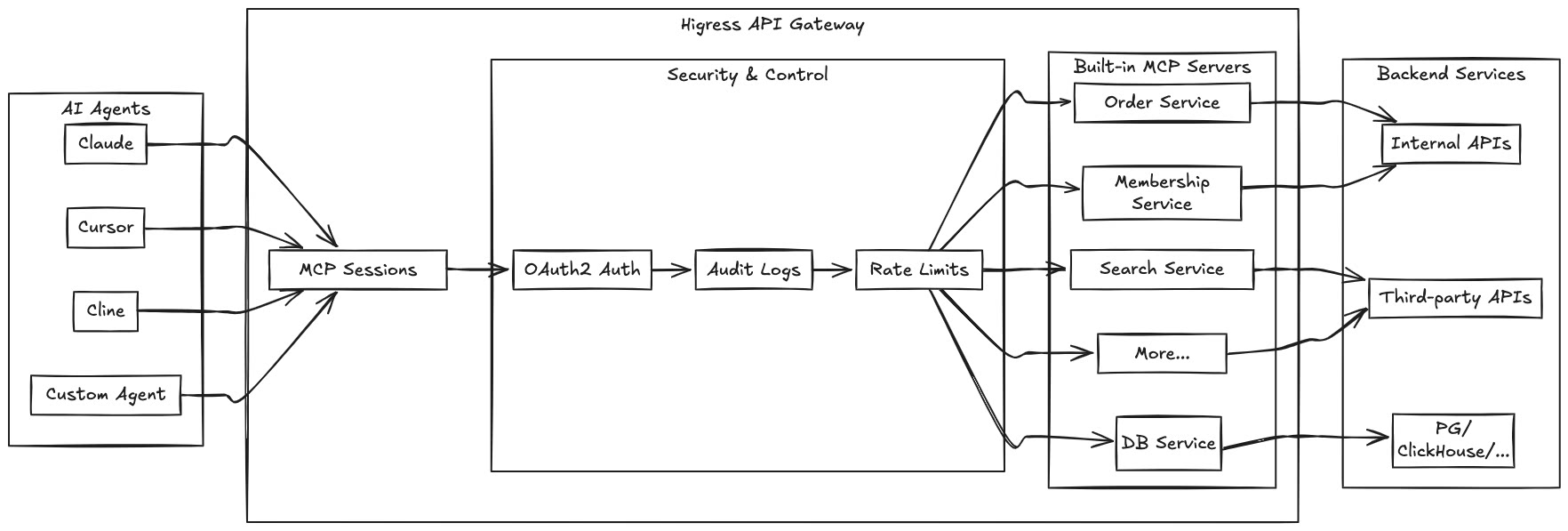
Key benefits of hosting MCP Servers with Higress:
-
Unified authentication and authorization mechanisms
-
Fine-grained rate limiting to prevent abuse
-
Comprehensive audit logs for all tool calls
-
Rich observability for monitoring performance
-
Simplified deployment through Higress's plugin mechanism
-
Dynamic updates without disruption or connection drops
-
-
AI Gateway:
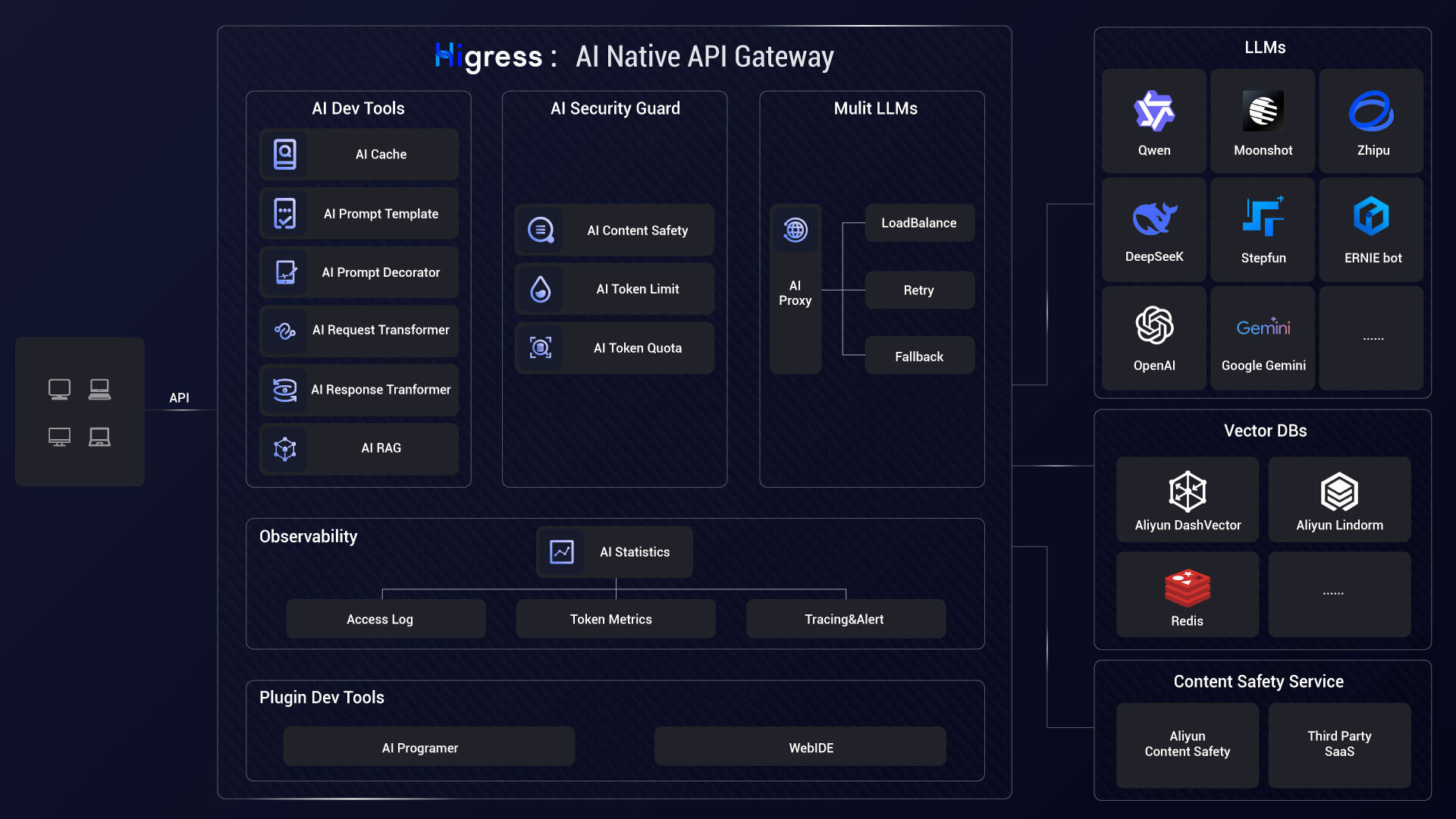
Higress connects to all LLM model providers using a unified protocol, with AI observability, multi-model load balancing, token rate limiting, and caching capabilities:
-
Kubernetes ingress controller:
Higress can function as a feature-rich ingress controller, which is compatible with many annotations of K8s' nginx ingress controller.
Gateway API support is coming soon and will support smooth migration from Ingress API to Gateway API.
-
Microservice gateway:
Higress can function as a microservice gateway, which can discovery microservices from various service registries, such as Nacos, ZooKeeper, Consul, Eureka, etc.
It deeply integrates with Dubbo, Nacos, Sentinel and other microservice technology stacks.
-
Security gateway:
Higress can be used as a security gateway, supporting WAF and various authentication strategies, such as key-auth, hmac-auth, jwt-auth, basic-auth, oidc, etc.
Core Advantages
-
Production Grade
Born from Alibaba's internal product with over 2 years of production validation, supporting large-scale scenarios with hundreds of thousands of requests per second.
Completely eliminates traffic jitter caused by Nginx reload, configuration changes take effect in milliseconds and are transparent to business. Especially friendly to long-connection scenarios such as AI businesses.
-
Streaming Processing
Supports true complete streaming processing of request/response bodies, Wasm plugins can easily customize the handling of streaming protocols such as SSE (Server-Sent Events).
In high-bandwidth scenarios such as AI businesses, it can significantly reduce memory overhead.
-
Easy to Extend
Provides a rich official plugin library covering AI, traffic management, security protection and other common functions, meeting more than 90% of business scenario requirements.
Focuses on Wasm plugin extensions, ensuring memory safety through sandbox isolation, supporting multiple programming languages, allowing plugin versions to be upgraded independently, and achieving traffic-lossless hot updates of gateway logic.
-
Secure and Easy to Use
Based on Ingress API and Gateway API standards, provides out-of-the-box UI console, WAF protection plugin, IP/Cookie CC protection plugin ready to use.
Supports connecting to Let's Encrypt for automatic issuance and renewal of free certificates, and can be deployed outside of K8s, started with a single Docker command, convenient for individual developers to use.
Community
Join our Discord community! This is where you can connect with developers and other enthusiastic users of Higress.

Thanks
Higress would not be possible without the valuable open-source work of projects in the community. We would like to extend a special thank you to Envoy and Istio.
Related Repositories
- Higress Console: https://github.com/higress-group/higress-console
- Higress Standalone: https://github.com/higress-group/higress-standalone